
What is Google Web Guide? What Law Firms Need to Know.
Google Web Guide:
What Law Firms Need to Know Right Now
Google's newest AI search experiment is the first one that actually encourages clicks rather than suppressing them. Here's how Web Guide works, why it matters for criminal defense, personal injury, and family law firms, and exactly how to position your content to show up inside it.

For the past two years, law firm marketers have been watching AI Overviews and AI Mode swallow organic click share with growing dread. Every new AI search feature seemed designed to answer the question without sending traffic anywhere. Then Google quietly launched something different.
Google Web Guide — a Search Labs experiment that rolled out July 24, 2025 — organizes search results into themed, clickable clusters powered by Gemini AI. Unlike every other AI search feature Google has shipped, Web Guide's entire structure is built around getting users to click through to websites. For law firms that have invested in topically deep, well-structured content, this is the most favorable AI search development in years.
Here's everything you need to know to understand it, access it, and position your firm's content to appear inside it.
What Is Google Web Guide?
Google Web Guide is an experimental AI-powered search feature that uses a custom version of Gemini to reorganize the search results page into themed, clickable groups of website links — rather than a traditional ranked list. Every result is a real link to a real website. It is available via Google Search Labs as an opt-in experiment.
Google Web Guide is a Search Labs experiment that uses a custom version of Gemini to organize search results into themed groups, rather than displaying the traditional 10 blue links.
It's a hybrid of generative AI and the traditional search experience. You get an AI-generated answer for your query and a curated collection of real webpages you can explore.
Think of it like a magazine layout for search. Instead of a flat list, users see results sorted under editorial headings — "Comprehensive Guides," "Case Studies," "Local Experts," "Expert Analysis" — each containing several clickable links. For a query like "what to do after a car accident," a user might see clusters for immediate steps, medical considerations, insurance guidance, and when to call an attorney. Your firm's content could appear under any of those themes.
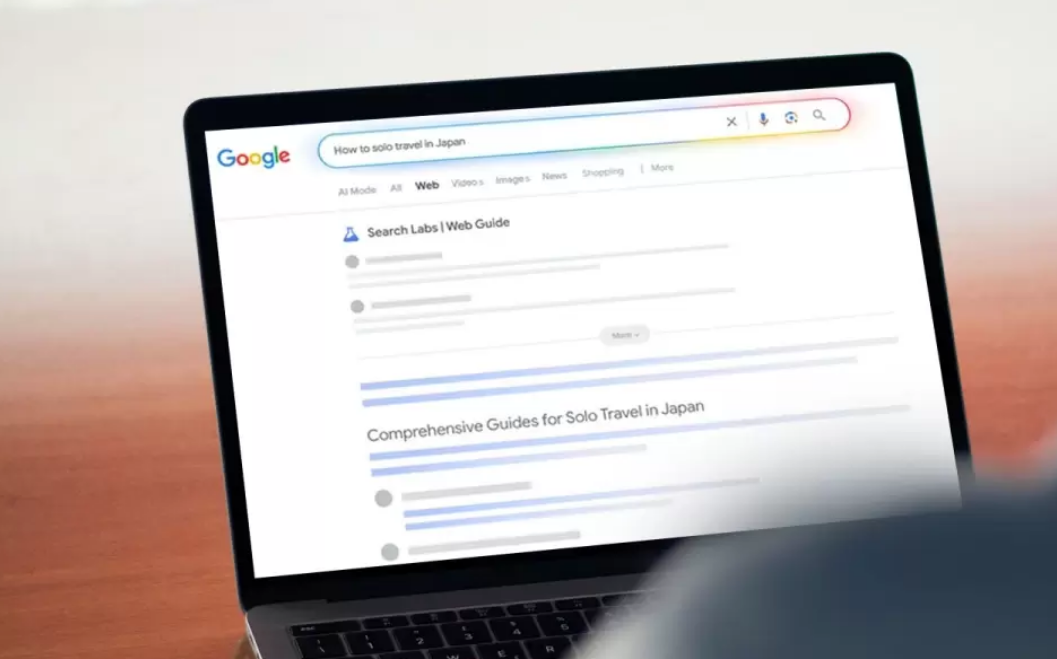
Web Guide adds topic headings in search results, similar to how news publications break up text in a story with subheads to make reading easier. For example, if a user searches "how to solo travel in Japan," they'll see headings like "Comprehensive Guides for Solo Travel in Japan" and "Personal Experiences and Tips."
For law firms, the analogy translates directly. A search for "how to fight a DUI charge in Texas" could surface clusters for legal defense strategies, recent case law, local attorneys, and FAQs — giving firms with comprehensive, structured content multiple opportunities to appear.
How Does Google Web Guide Work?
Web Guide operates on two interconnected technical mechanisms: query fan-out and thematic clustering. Understanding both tells you exactly what kind of content it rewards.
Query Fan-Out
Web Guide uses a query fan-out technique, like Google does with AI Mode, concurrently issuing multiple related searches to identify the most relevant results. "Web Guide uses a custom version of Gemini to better understand both a search query and content on the web, creating more powerful search capabilities that better surface web pages you may not have previously discovered," Google confirmed.
When a prospective client searches "personal injury lawyer consultation," Web Guide doesn't just search that phrase. Gemini simultaneously queries related intents — "what to expect at a PI attorney consultation," "how much does a PI lawyer cost," "best PI lawyers near me" — and then synthesizes the results into organized groups. The implication: your content doesn't need to target a single keyword. It needs to genuinely address the topic in depth.
Thematic Clustering
Unlike a fan-out, which guesses at additional information for a searcher, Web Guide analyzes the content of top-ranking pages and groups them by topic. AI then summarizes each category, providing an overview of the pages.
This is the mechanism that makes Web Guide uniquely useful for content strategy. Gemini reads your pages, assigns them to semantic themes, and decides which cluster they best fit. Pages that clearly own a single topic — your DUI defense page, your medical malpractice FAQ, your personal injury intake process explainer — are exactly what this system rewards.
Google launches Web Guide in Search Labs. Initially reorganizes the "Web" tab only.
Google begins testing Web Guide in the main "All" tab for some users. Opt-in experiment receives positive public feedback.
Web Guide confirmed available in the U.S. with Google expanding access to additional markets internationally.
Experiment continues maturing. Long-term product status not confirmed, but Google has signaled strong continued investment.
How to Access Google's Web Guide
Go to labs.google.com/search → find the Web Guide experiment → toggle it on. Once active, perform any Google search and click the "Web" tab — you'll see the grouped result layout. You can toggle back to classic results from within the Web tab at any time without disabling the experiment.
Web Guide is a Search Labs experiment that is opt-in. The experiments can be turned on or off at any time. Google suggests the feature works well for open-ended search queries, like "how to solo travel in Japan" or even more complex, multi-sentence queries.
For law firm marketers and attorneys, accessing and using Web Guide is itself a strategic exercise. Search your own practice area terms — "criminal defense attorney [city]," "personal injury lawyer free consultation," "divorce attorney near me" — and observe which firms appear in which clusters, what topic groupings Gemini creates, and which content categories are underserved in your market. This is intelligence your competitors likely aren't gathering yet.
What to Look For
- Which thematic clusters appear for your core practice area queries
- Which competitor pages are being clustered — and under what headings
- Which topic groupings have thin or no representation from local firms
- Whether your own pages appear, and in which clusters they're placed
- What content types (guides, FAQs, case types, local content) earn cluster placement
Is Your Firm's Content Positioned for AI Search?
Dashing Digital specializes exclusively in SEO, AEO, and ORM for criminal defense, personal injury, and family law firms in competitive markets. Let's talk about what Web Guide means for your visibility.
Schedule a Free Strategy CallHow Is Web Guide Different from AI Overviews and AI Mode?
This is the question that matters most for law firm marketing budgets. The three AI search features serve fundamentally different purposes — and have very different implications for your website traffic.
| Feature | AI Overviews | AI Mode | Web Guide |
|---|---|---|---|
| Format | Synthesized summary at top of SERP | ChatGPT-style conversational interface | Organized clusters of real website links |
| Clicks Required? | ✗ Often satisfies without clicks | ✗ Often satisfies without clicks | ✓ Every result is a clickable link |
| Website Friendly? | ✗ Reduces click share | ✗ Replaces traditional results | ✓ Most website-friendly AI feature Google has shipped |
| Ad Revenue Impact | ✗ Cannibalizes ad inventory | ✗ Reduces ad opportunity | ✓ Preserves click-based ad structure |
| Access | Default for most users | Opt-in via Search Labs | Opt-in via Search Labs |
| AI Compute Cost | High (generative) | Very High (conversational AI) | ✓ Lower (organizes, doesn't generate) |
Web Guide sits somewhere between Google's traditional search results and its newer AI-powered features. Traditional search results are a ranked list of pages based on relevance and authority. AI Overviews synthesize information from multiple sources into a concise summary at the top of results. AI Mode offers a conversational experience where you can ask follow-up questions. Web Guide takes a hybrid approach — instead of just generating an answer or ranking pages by authority, it groups results into thematic clusters, creating a guided path to explore relevant content on the web.
The key distinction for law firms: AI Overviews and AI Mode are fundamentally zero-click-friendly. Web Guide is click-dependent by design. If a prospective client searching for a family law attorney in your market sees Web Guide results, they have to click a link to learn more. That's the traffic model law firms spent the last decade building for.
Web Guide May Actually Improve Click-Through Rates
This is the headline that law firm marketing directors should be circulating internally. In an era when roughly 60–65% of Google searches now end without a click, Web Guide is a meaningful counter-current.
"What's different about Web Guide is that — unlike AI Overviews or AI Mode — it actually encourages users to click, which makes it the most website-friendly AI search feature Google has shipped so far. Is this the click comeback we've all been waiting for?"
— Ahrefs, April 2026Web Guide is the most "website-friendly" of the three AI features because every result is a clickable link. Unlike AI Overviews and AI Mode, which can satisfy queries without a click, Web Guide lays out the SERP in magazine-style segments supported by link cards and multimedia content. While there are supporting AI summaries, users still have to click through for the meat of the content.
Why This Matters for High-Intent Legal Queries
Legal searches are almost always high-intent and emotionally charged. Someone searching "how to get a DUI dismissed" or "child custody lawyer near me" is not casually browsing — they need substantive help. Web Guide's cluster format is well-suited to these queries because it presents multiple relevant content types (guides, local attorneys, FAQs, case studies) without pretending a one-sentence AI summary is sufficient. The user has to click to get the real answer.
For firms that have built out comprehensive practice area content, FAQ libraries, and location-specific pages, Web Guide could meaningfully recover click share that AI Overviews have been eroding since 2024. The firms positioned to win are those already investing in depth and topical authority — not those chasing keyword density.
Topic Depth Wins
Pages that thoroughly address a single legal topic — not broad overviews — are better candidates for cluster placement because Gemini can cleanly classify them.
Multiple Content Types
Firms with diverse content — practice area pages, FAQ pages, blog guides, case type pages — have more surface area to appear across multiple clusters in a single search.
Underserved Markets
In many mid-size legal markets, content gaps are enormous. Web Guide surfaces these gaps visibly — and the firm that fills them first owns the cluster.
Compound Visibility
A firm could appear in multiple clusters for a single query — dramatically increasing brand exposure even before a click occurs, like a digital billboard across multiple SERP sections.
Will Web Guide Take Over AI Overviews or AI Mode?
The honest answer is: probably not a full takeover — but Web Guide may become Google's preferred long-term format for informational and navigational queries, for reasons that have more to do with Google's business model than user preference.
Adding to that, ads appearing alongside AI Overviews have grown dramatically through 2025 — from near zero earlier in the year to appearing on a significant share of AI Overview SERPs by year-end. Google is aggressively ramping up its monetization — but, at the same time, it's cannibalizing its highest-value ad inventory. Web Guide is a straightforward solution to that problem. It serves every result as a clickable link, which keeps ad opportunity intact. Another advantage Web Guide has over AI Overviews and AI Mode is it's an "AI-lite" solution that's cheaper to run. It uses AI to organize and label results, not to generate long-form answers, which means it has a significantly lower compute cost.
The three AI experiences appear destined to coexist rather than compete for dominance. Soon, Google may have three official AI search experiences: Web Guide, AI Overviews, and AI Mode. The likely long-term configuration:
- AI Overviews — Quick summary answers for simple, definitional queries ("what is a deposition," "what is comparative negligence")
- AI Mode — Conversational, multi-turn research for complex exploratory queries
- Web Guide — Organized, clickable discovery for informational and local-intent queries where users want to explore options
For law firms, Web Guide matters most in the discovery and comparison phase — exactly when prospective clients are shortlisting attorneys. That makes it the highest-value placement of the three from a client acquisition standpoint.
While there's no guarantee Web Guide will become a permanent fixture, Google has yet to abandon any generative AI feature it has introduced so far. Given its economic advantages — preserved ad revenue and lower compute costs — Web Guide has stronger structural incentives for survival than the features it runs alongside.
How to Optimize Your Law Firm's Content for Web Guide
The good news: if you've been following modern SEO and AEO best practices, you're already better positioned than most firms. Web Guide rewards the same fundamentals — topical depth, clear structure, strong E-E-A-T signals, and semantic coherence. The difference is that you now need to think about content at the cluster level, not just the page level.
1. Build Topically Distinct Pages
Web Guide clusters pages by semantic theme. That means your DUI defense page, your drug possession page, and your license suspension page need to be clearly distinct in topic, structure, and intent — not variations of the same content with different keywords swapped in. Gemini needs to be able to read your page and confidently assign it to one clear category.
2. Map Your Content to Likely Cluster Categories
Web Guide provides a summary that also indicates how Google interprets a query. Creators looking to search-optimize an article or course can use the cluster list for topics to include. Use Web Guide actively as competitive intelligence. Search your target queries, study the clusters, and identify which categories you aren't yet represented in.
3. Strengthen Internal Linking
Internal linking matters more than ever. Structured, contextual navigation gets picked up by Web Guide's AI. For law firms, this means building clear content hubs: a practice area pillar page with strong internal links to case type pages, FAQ pages, local pages, and attorney profile pages. The goal is to help Gemini understand the topical relationships between your content.
4. Write with Semantic Clarity
Every page should lead with a clear, direct answer to the primary question it addresses. Use structured headings (H2, H3), short answer paragraphs followed by depth, and FAQ sections that address secondary questions. Content must be digestible by LLMs, not just search crawlers. AI-readable signals are key.
5. Implement Complete Schema Markup
Schema markup helps Gemini accurately interpret your content type and subject matter. For law firms, priority schema types include:
- LegalService schema on practice area pages with practice type, jurisdiction, and fee information
- FAQPage schema on FAQ sections — directly signals the question-answer structure Web Guide values
- Article schema on blog and guide content with author markup that reinforces E-E-A-T
- LocalBusiness / Attorney schema with precise geo coordinates, service area, and NAP data
- BreadcrumbList schema to signal content hierarchy and cluster relationships
6. Invest in Content Diversity, Not Just Volume
Web Guide clusters different content types separately. A single comprehensive guide and a separate FAQ page targeting the same topic can appear in different clusters within the same search — giving your firm two placements where a competitor with only one content type gets one. Prioritize building:
- Practice area pillar pages (comprehensive, authoritative)
- Case type sub-pages (focused, single-topic depth)
- FAQ hub pages (structured Q&A, FAQPage schema)
- Location-specific pages (city/neighborhood targeting)
- Legal guide content (evergreen educational content for prospective clients)
- Attorney profile pages (personal E-E-A-T, recognition by name in AI systems)
7. Prioritize E-E-A-T Signals
Because Web Guide is powered by Gemini evaluating content quality — not just keyword relevance — Experience, Expertise, Authoritativeness, and Trustworthiness signals carry significant weight. For law firms: ensure attorney bios are linked from content, cite relevant case outcomes and credentials, link to authoritative external sources (state bar, court records), and keep content current with dates and updates.
How to Track Your Firm's Visibility in Web Guide Results
Here's the current reality: Google has not yet added a dedicated Web Guide filter to Google Search Console or Google Analytics 4. As of April 2026, Web Guide traffic is being bucketed into organic search data — which creates both a challenge and an opportunity. Firms that establish baselines now will have the most actionable data when dedicated reporting eventually arrives.
Google Search Console: Monitor CTR Trends
In GSC's Performance report, filter by queries related to your target practice areas and monitor click-through rate over time. Weekly monitoring of impressions and CTR becomes a leading indicator — even before traffic starts to decline. In SERPs that increasingly answer queries directly, a rising CTR on key queries may signal Web Guide placement is driving more clicks than traditional SERP formats.
- Set a GSC date range baseline from before you implement Web Guide optimizations
- Track CTR by page and by query — rising CTR without rising impressions often signals a SERP format shift
- Watch for new "Search appearance" filter options in GSC as Web Guide matures
- Monitor the Pages report for unexpected pages earning new impressions (Web Guide may surface pages that weren't previously ranking)
GA4: Organic Session Quality
In GA4, segment organic traffic and monitor engagement rate, session duration, and pages per session. GA4 helps you understand what users actually do on your site — what they engage with, where they drop off, and what drives them to take action. If Web Guide is driving higher-intent visitors (because they've already reviewed a themed cluster before clicking), you may see improved engagement metrics even at flat or modestly growing traffic levels.
Third-Party AI Visibility Tools
For broader AI search monitoring, tools like Profound, Otterly.ai, and Ahrefs' Brand Radar now track AI citation patterns across Gemini, ChatGPT, and Perplexity. While Brand Radar tracks AI Overviews and AI Mode rather than Web Guide specifically, shifts in AI citation patterns can indicate whether Gemini is surfacing your pages more or less frequently.
- Set up Profound or Otterly.ai tracking for your firm's core practice area queries
- Monitor whether your pages are cited in AI Overviews — firms cited there tend to appear in Web Guide clusters as well
- Manually spot-check Web Guide for your target queries weekly and screenshot cluster compositions
- Use Ahrefs or Semrush to track organic position changes that may correlate with Web Guide inclusion
"Google has historically been secretive about data from low-click AI surfaces — but I expect it could be a different story with Web Guide. After all, it's a SERP that actively encourages clicks, so there's less reason to hide the numbers."
— Ahrefs, 2026The expectation in the SEO industry is that dedicated Web Guide reporting will arrive in Search Console as the experiment graduates from Search Labs to a full product. When that happens, the firms that have already built the right content infrastructure will have a meaningful head start. The time to optimize is before that data becomes widely visible — not after your competitors have already colonized the clusters.
Frequently Asked Questions
Google Web Guide is a Search Labs experiment launched July 24, 2025, that uses a custom version of Gemini AI to organize search results into themed, clickable groups rather than a traditional ranked list. Every result is a real link to a real website. Available in the U.S. as an opt-in feature, it clusters relevant pages under topic headings so users can explore content in a guided, structured format.
AI Overviews generate a synthesized answer at the top of search results, often satisfying the query without requiring a click to an external website. Google Web Guide instead organizes real website links into thematic clusters under topic headings — every result is clickable and leads to an actual page. Web Guide is substantially more beneficial for law firm websites than AI Overviews.
No — Web Guide is the most website-friendly AI search feature Google has released. Unlike AI Overviews or AI Mode, which can answer queries without clicks, Web Guide surfaces every result as a clickable link and groups pages into curated categories. For law firms with strong, topically organized content, Web Guide may actually improve click-through rates compared to traditional SERPs dominated by AI Overviews.
Focus on topically distinct pages (each page clearly owns one subject), strong internal linking between related practice area and FAQ content, complete schema markup (LegalService, FAQPage, Article, LocalBusiness), diverse content types across your site, and robust E-E-A-T signals. Web Guide rewards the same fundamentals as strong SEO and AEO — depth, clarity, structure, and authority.
Visit labs.google.com/search, find the Web Guide experiment, and toggle it on. Once enabled, Google will reorganize the "Web" tab in Google Search into themed clusters. You can toggle between Web Guide and classic results within the Web tab at any time without disabling the experiment entirely. As of April 2026, Web Guide is available in the U.S. with expansion to additional markets underway.
A full replacement is unlikely. The three AI search experiences are more likely to coexist: AI Overviews for quick definitional answers, AI Mode for conversational research, and Web Guide for organized discovery and local-intent queries. Web Guide has strong structural advantages — it preserves ad revenue and has lower compute costs — giving it better long-term economic viability than the alternatives.
Currently, there's no dedicated Web Guide filter in Google Search Console or GA4. Monitor organic CTR trends in GSC (a rising CTR may reflect Web Guide placements), track AI citations with tools like Profound or Otterly.ai, and manually spot-check your target queries in Web Guide weekly. Establish a performance baseline now so you have historical data when dedicated Web Guide reporting arrives in Search Console.
The Bottom Line for Law Firms
Google Web Guide is early-stage and opt-in today. But so was AI Overviews — and now it shapes nearly every high-value legal search result page. The firms that studied AI Overviews early and built for them are better positioned now. The same window exists with Web Guide, and it won't stay open indefinitely.
The strategic posture is clear: build content that Gemini can classify, structure it so clusters form naturally, implement schema that signals intent and authority, and monitor your organic CTR baselines so you can measure impact as Web Guide scales. None of this requires abandoning your existing SEO strategy. It requires deepening it.
Law firms that win search visibility in 2026 and beyond are the ones treating AI search features as infrastructure to build for — not threats to manage around. Web Guide is the first AI search feature that genuinely rewards that investment with clicks. That changes the calculus.
Ready to Build a Content Strategy That Wins in AI Search?
Dashing Digital builds legal-exclusive SEO, AEO, and ORM strategies for firms competing in the most aggressive metro markets in the country. Let's talk about your visibility.
Talk to an Expert — It's Free
